Need help with E-Filing? This section explains how to navigate E-Filing, how to register and update your E-Filing profile, how to submit and retrieve documents and how get technical help.
In order to use the Competition Tribunal’s Secure E-Filing, you must comply with the Tribunal’s requirements for filing electronic documents.
|
Filing of electronic documents
- To use the Tribunal’s Secure E-Filing, make sure that you meet all requirements.
- On the E-Filing web page, you need to create an E-Filing user profile.
|
Registering Your E-Filing profile
You must create a personal E-Filing profile to access Case information with the E-Filing Service. After you register this profile, a confirmation page informing you of the approval process will be displayed.
Once it has approved your registration, you will have full access to the E-Filing.
- To create your E-Filing profile, the following information is required:
- First name (mandatory)
- Last name (mandatory)
- E-mail (mandatory)
- Telephone number (mandatory)
- Law Firm name (where applicable)
- Website
- Language preference
- Recovery question
- Recovery answer
- Password
|
Updating Your E-Filing profile
-
You can update and manage your E-Filing profile by clicking the « UPDATE Your E-Filing profile » button on the E-Filing home page.
-
- You can update your profile with the following 2 options:
-
Option 1 - Modify: make changes to your E-Filing profile.
- This action will update the database to ensure information associated with your E-Filing profile is current.
-
Option 2 - Remove: erase your E-Filing profile entirely.
- This action will remove the information associated with your E-Filing profile from the database.
|
Submitting Documents
-
You can submit more than one document at a time to the Competition Tribunal by clicking the « SUBMIT documents » button on the E-Filing home page and by following these steps:
- Step 1– Select a Case by clicking on any « Select a Case » button and by selecting the Case number and Case name for which you wish to submit documents.
-
Step 2– To browse, click the « Choose File » button. Select your files - one at a time. Click the « Attach » button to add it to the list of files to transfer. All documents submitted through E-Filing are automatically sent to the Tribunal.(You can submit more than one document. Repeat this process as many times as needed.)
- Step 3– Review the list of your documents. You can remove unwanted documents by “deselecting” the « Selection » check box located to the right of the document. Consequently, the document will not be transmitted to the Tribunal.
- Step 4– Enter a message (optional).
- Step 5– Confirm that your documents contain public only information or contain public and confidential information.
- Step 6– Click « Submit » to send your document(s) to the Tribunal.
After submitting your documents, a confirmation page listing the documents you have submitted to the Tribunal will be displayed. The confirmation page also shows the date and time of your submission. A copy of this confirmation will be e-mailed to you. The Tribunal will also receive an e-mail informing it that new documents have been submitted, and an electronic stamp will be affixed to the documents.
|
Retrieving Documents
-
The « RETRIEVE documents » function allows users who have registered an E-Filing profile with the Tribunal to retrieve Case documents served on them.
You can retrieve a document by clicking the « RETRIEVE documents » button on the E-Filing home page.
Step 1– Select a Case by clicking on any « Case Type » button and by selecting the Case number and Case name for which you wish to retrieve documents.
Options: You have several filter options to retrieve documents. The following options are available:
- By Date (last 5 days, last 7 days, last 10 days or last 14 days);
- By Exhibit Number;
- By Description of Exhibit (entering a short title or keyword);
- By Volume Name;
- By Volume Number;
- By Company;
- Or by Selecting All Documents.
-
Step 2– Choose one of these options to retrieve documents and click the magnifier
 link. The list of documents will be displayed on the page.
-
Step 3– Click the « New » button to retrieve a new document or click the « Retrieved » button to retrieve a document previously opened.
Note: By default, all documents are available for 30 days. Once the 30 days have elapsed, documents will no longer be available on the E-Filing website.
|
E-Filing Opened Session
- If you try to log in using another tab in the current internet browser or using another browser while already logged in, a message will be displayed. You will have to end your session if you choose to continue with another tab in the current internet browser or another browser.
|
E-Filing Session Expired
- E-Filing sessions expire automatically after 30 minutes of inactivity. If your E-Filing session has expired, a page informing you that your session has expired will be displayed. From this page you can log back in to E-Filing using your e-mail address and password.
|
LOG OUT
-
Clicking the « LOG OUT » » link will disconnect you from the E-Filing. A log out confirmation page will be displayed, and you will be given the opportunity to immediately log in again.
If you decide to log in again, you will be redirected to the main login page, where you will need to enter your e-mail address and password to access the E-Filing.
|
Availability of Service
-
The E-Filing is available at all times; however, technical support and document processing services will be available during the Tribunal’s regular business hours, Monday to Friday from 8:30 a.m. to 4:30 p.m. (ET).
- The non-availability of the service due to technical failures will not affect statutory and administrative deadlines.
|
Contact Us
- If you require assistance navigating, browsing the E-Filing website or have a question, you can e-mail or phone us. Please click the « Contact Us » button (from the top menu bar of the E-Filing home page) for information on how to reach us.
|
Accessibility
-
• The E-Filing application is designed to be accessible to all users, including persons with disabilities who use adaptive technologies to receive and disseminate information. It is designed in accordance with Priority 1 and Priority 2 checkpoints of the World Wide Web Consortium (W3C) and the
Web Standards for the Government of Canada.
We aim to develop and maintain an accessible website, as well as welcome your comments and suggestions for making this website more accessible. If you have trouble viewing or retrieving the contents or services of this site for accessibility reasons or would like to send us your comments or suggestions, please contact
filing.depot@ct-tc.gc.ca
.
|
Official Languages
-
If you click on « Français » (in the right corner of the top menu bar), the French version of this page will be displayed automatically. You can return to the English version of the site by clicking on « English » (in the right corner of the top menu bar).
The Competition Tribunal respects the
Official Languages Act
and the relevant Treasury Board policies, and is committed to ensuring that all information and services on this site are available in both English and French. However, some of the documents on this website, provided by external sources that are not subject to the Official Languages Act, are provided solely as a convenience and are available only in the language in which they were provided.
|
Technical Help
- If you need technical support on the Secure E-Filing, please contact us by telephone at (613) 941-2440 or send an e-mail to filing.depot@ct-tc.gc.ca.
- Business hours are from 8:30 a.m. to 4:30 p.m. (ET), Monday to Friday.
Disable Pop-up blocker
-
CHROME
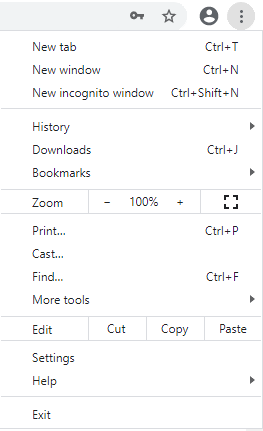
Click the 3-dot button the top right of your browser

Click the Settings button;
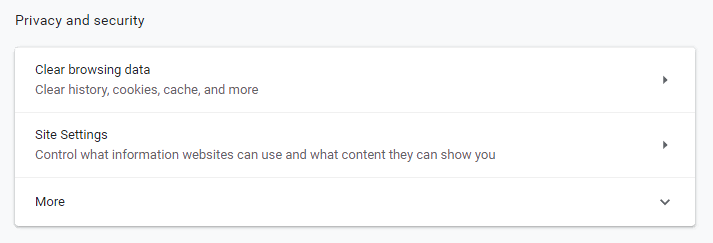
Click Site Settings;
Now, click Popups and redirects;
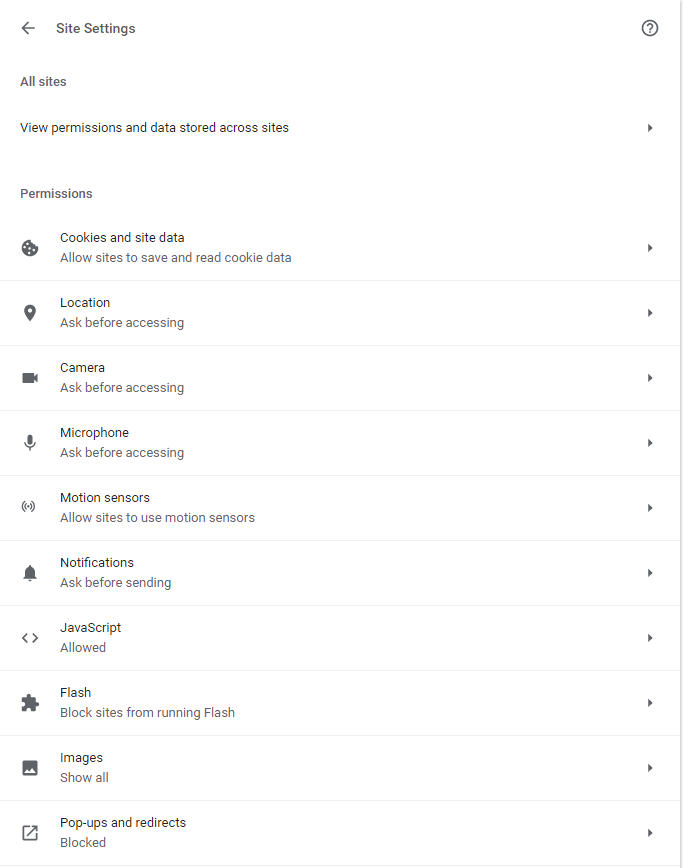
Make sure the toggle button beside allowed in on (dark blue);

-
INTERNET EXPLORER
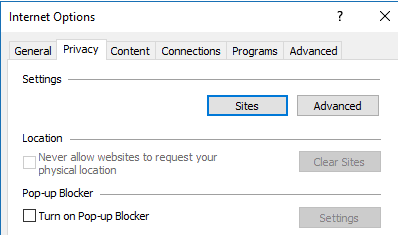
Click the gear on the top right of your browser

Click Internet Options
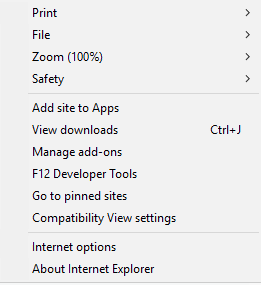
Go to the Privacy tab;

Deselect Turn on Popup Blocker;